GST Reports and Utilities
This section is only relevant to those who are registered with the Royal Malaysian Customs Department (RMCD) to collect GST.
If you have entered your sales and purchasing data via the document issuing subsystems such as the Invoice, Purchase Order, Debit Note, Credit Note subsystems, as well as posting to the accounts accurately, then you may make use of the GST Reports and Utilities command to generate the necessary reports for you to submit your GST returns as well to export the GST Audit File whenever the RMCD requests for it.
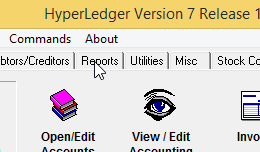
To use the command, please click the Reports tab:
and then click the GST Reports and Utilities command:

You would get to this form:
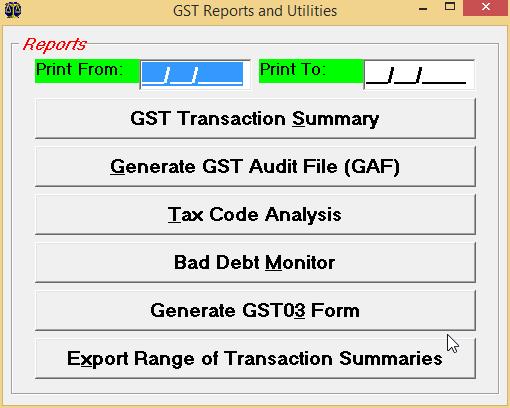
If you wish to generate the GST transaction summary, please fill in the dates and then click the GST Transaction Summary button. As usual, you may also double-click on the Print From and Print To fields, to select dates from a list.
Click the GST Transaction Summary button to preview the report:
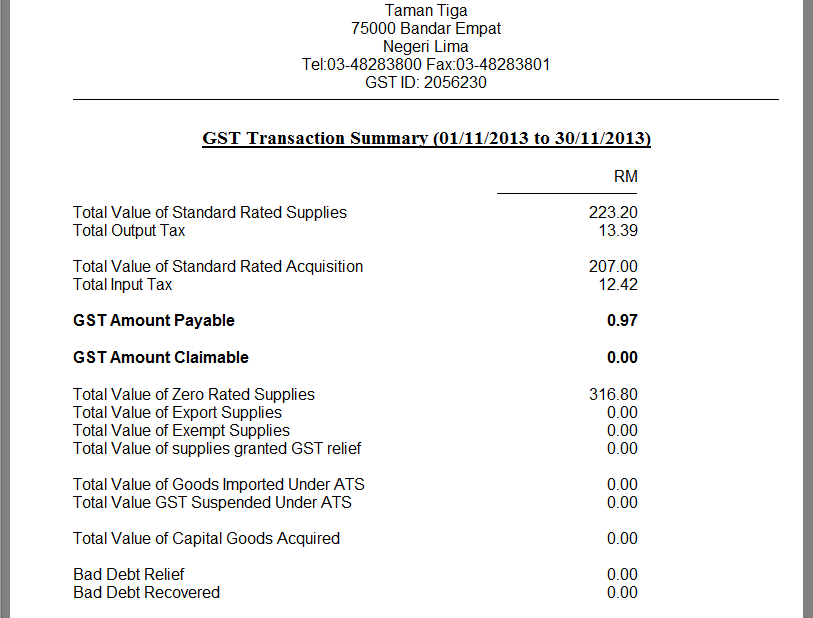
With this report, you may then use it to fill your GST03 form, but that's usually not necessary. You may use the Generate GST03 form command to either prepare a TAP file for submission online or to generate a PDF file that you may print out.
If the RMCD requires you to generate the GST Audit File (GAF) for them, please click the Generate GST Audit File (GAF) button. HyperLedger would then ask you for the location to save the GAF.txt file to. The default location where the file would be saved to is your desktop. You may change the name of the file and the location to save to and then click the Save button.